Ansible Password Expiration: Manage User Account Aging & Policies
By Luca Berton · Published 2024-01-01 · Category: installation
How to manage password expiration with Ansible user module. Set expiry dates, maximum age, warning periods, and enforce password rotation policies.
How to set user password expiration time on Linux with Ansible?
See also: Ansible Create User Account: user Module Complete Guide
Ansible user password expiration
- ansible.builtin.user
- Manage user accounts
user.
The full name is ansible.builtin.user, which means that is part of the collection of modules "builtin" with ansible and shipped with it.
It's a module pretty stable and out for years, it manages user accounts and supports a huge variety of Linux distributions.
For Windows, use the ansible.windows.win_user module instead.
Linux password aging policy
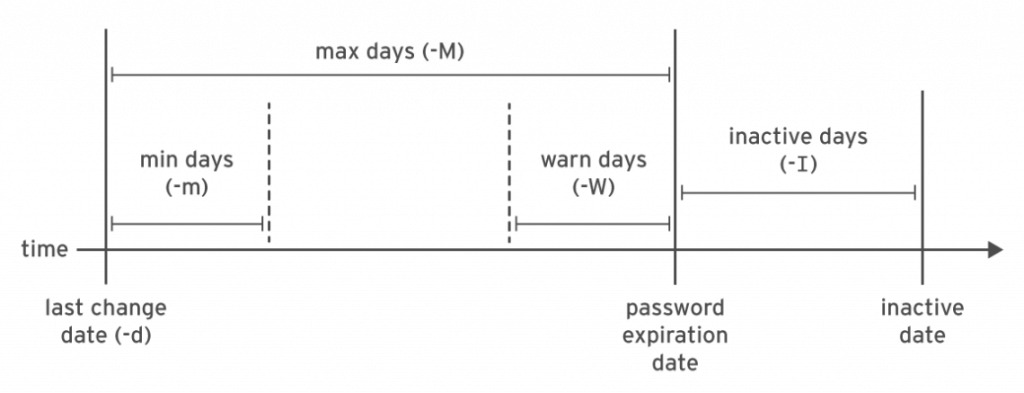
This schema represents the Linux password aging policy.
Let me highlight that the Ansible native module user is able to set only the min days -m and max days -M parameter.
Max days set password policy for requesting password should be renewed, for example in every 90 days.
Min days set the minimum days should be waiting for changing the password again, for example after 7 days from the last change.
To disable password aging specify the value of 99999.
For the other parameters, you need to rely on the chage command-line utility or via the Ansible shell module.
See also: Ansible group Module: Create & Manage Linux Groups (ansible.builtin.group)
Parameters
- name string - username
- password_expire_min integer - Linux min days validity (-m)
- password_expire_max integer - Linux max days validity (-M)
password_expire_min parameter you specify the value of the min days validity.
In the password_expire_max parameter you specify the value of the max days' validity.
Please note that these parameters are Linux only.
## Playbook Set user password expiration time with Ansible Playbook.
Pleasee note: user module password_expiry_min bug and workaround.
code
- user_expiration.yml
---
- name: user module Playbook
  hosts: all
  become: true
  vars:
    myuser: "example"
  tasks:
    - name: password expiration
      ansible.builtin.user:
        name: "{{ myuser }}"
        password_expire_min: 7
        password_expire_max: 90
execution
$ ansible-playbook -i Playbook/inventory user\ expiration/user.yml

PLAY [user module Playbook] **********************************************************************************

TASK [Gathering Facts] ***********************************************************************************
ok: [demo.example.com]

TASK [password expiration] *******************************************************************************
changed: [demo.example.com]

PLAY RECAP ***********************************************************************************************
demo.example.com           : ok=2    changed=1    unreachable=0    failed=0    skipped=0    rescued=0    ignored=0
before execution
$ ssh devops@demo.example.com
Last login: Mon Nov  8 17:07:10 2021 from 192.168.43.5
[devops@demo ~]$ sudo su
[root@demo devops]# chage --help
Usage: chage [options] LOGIN

Options:
-d, --lastday LAST_DAY        set date of last password change to LAST_DAY
-E, --expiredate EXPIRE_DATE  set account expiration date to EXPIRE_DATE
-h, --help                    display this help message and exit
-I, --inactive INACTIVE       set password inactive after expiration
to INACTIVE
-l, --list                    show account aging information
-m, --mindays MIN_DAYS        set minimum number of days before password
change to MIN_DAYS
-M, --maxdays MAX_DAYS        set maximum number of days before password
change to MAX_DAYS
-R, --root CHROOT_DIR         directory to chroot into
-W, --warndays WARN_DAYS      set expiration warning days to WARN_DAYS

[root@demo devops]# chage -l example
Last password change     : Nov 08, 2021
Password expires     : never
Password inactive     : never
Account expires      : never
Minimum number of days between password change  : 0
Maximum number of days between password change  : 99999
Number of days of warning before password expires : 7
after execution
$ ssh devops@demo.example.com
Last login: Mon Nov  8 17:09:16 2021 from 192.168.43.5
[devops@demo ~]$ sudo su
[root@demo devops]# chage -l example
Last password change     : Nov 08, 2021
Password expires     : Feb 06, 2022
Password inactive     : never
Account expires      : never
Minimum number of days between password change  : 0
Maximum number of days between password change  : 90
Number of days of warning before password expires : 7
[root@demo devops]# passwd example
Changing password for user example.
New password:
BAD PASSWORD: The password is shorter than 8 characters
Retype new password:
passwd: all authentication tokens updated successfully.
[root@demo devops]# passwd example
Changing password for user example.
New password:
BAD PASSWORD: The password is shorter than 8 characters
Retype new password:
passwd: all authentication tokens updated successfully.
[root@demo devops]# su - example
[example@Playbook ~]$ passwd
Changing password for user example.
Current password:
New password:
BAD PASSWORD: The password is shorter than 8 characters
passwd: Authentication token manipulation error
Conclusion
Now you know how to set user password expiration time on Linux with Ansible.See also: Ansible Manage Groups: Create, Delete & Modify with group Module
Set Password Expiry
- ansible.builtin.user:
    name: deploy
    password_expire_max: 90    # Must change every 90 days
    password_expire_min: 7     # Can't change within 7 days
  become: true
Full Password Policy
- user:
    name: "{{ item }}"
    password_expire_max: 90   # Max days between changes
    password_expire_min: 7    # Min days between changes
    password_expire_warn: 14  # Warn 14 days before expiry (not available in user module)
  loop: "{{ all_users }}"
  become: true

# Set warning days via chage (not in user module)
- command: "chage -W 14 {{ item }}"
  loop: "{{ all_users }}"
  become: true
Account Expiration (Not Password)
# Account expires on specific date
- user:
    name: contractor
    expires: 1735689600  # Unix timestamp: 2025-01-01
  become: true

# Never expire
- user:
    name: permanent_user
    expires: -1
  become: true

# Expire immediately (disable account)
- user:
    name: departed_user
    expires: 0
  become: true
Force Password Change on Next Login
- user:
    name: newuser
    password: "{{ temp_password | password_hash('sha512') }}"
  become: true
  no_log: true

- command: chage -d 0 newuser
  become: true
Check Password Status
- command: "chage -l {{ username }}"
  register: chage_output
  changed_when: false

- debug: var=chage_output.stdout_lines
# Output:
# Last password change                    : Apr 06, 2026
# Password expires                        : Jul 05, 2026
# Account expires                         : never
# Maximum number of days between changes  : 90
# Minimum number of days between changes  : 7
Compliance Policy Playbook
---
- name: Enforce password policy
  hosts: all
  become: true
  vars:
    password_max_days: 90
    password_min_days: 7
    password_warn_days: 14
    min_password_length: 12
  tasks:
    - name: Set password aging in login.defs
      lineinfile:
        path: /etc/login.defs
        regexp: "^{{ item.key }}"
        line: "{{ item.key }} {{ item.value }}"
      loop:
        - { key: PASS_MAX_DAYS, value: "{{ password_max_days }}" }
        - { key: PASS_MIN_DAYS, value: "{{ password_min_days }}" }
        - { key: PASS_WARN_AGE, value: "{{ password_warn_days }}" }
        - { key: PASS_MIN_LEN, value: "{{ min_password_length }}" }

    - name: Apply to existing users
      command: >
        chage -M {{ password_max_days }}
        -m {{ password_min_days }}
        -W {{ password_warn_days }}
        {{ item }}
      loop: "{{ managed_users }}"
PAM Password Quality
- name: Install password quality module
  apt: { name: libpam-pwquality, state: present }

- name: Configure password requirements
  lineinfile:
    path: /etc/security/pwquality.conf
    regexp: "^{{ item.key }}"
    line: "{{ item.key }} = {{ item.value }}"
  loop:
    - { key: minlen, value: 12 }
    - { key: dcredit, value: -1 }    # At least 1 digit
    - { key: ucredit, value: -1 }    # At least 1 uppercase
    - { key: lcredit, value: -1 }    # At least 1 lowercase
    - { key: ocredit, value: -1 }    # At least 1 special char
FAQ
password_expire_max vs expires?
password_expire_max controls how often the password must change. expires controls when the entire account becomes unusable — different things.
How do I exempt service accounts?
- user:
    name: service_account
    password_expire_max: -1  # Never expire
    system: true
  become: true
Does this work on all Linux distros?
Password aging uses /etc/shadow and chage, which work on all major Linux distributions.
Set Account Expiry Date
- ansible.builtin.user:
    name: contractor
    expires: 1735689600  # Unix timestamp: 2025-01-01
  become: true
Calculate Expiry (90 Days)
- user:
    name: contractor
    expires: "{{ (ansible_date_time.epoch | int + 86400 * 90) }}"
  become: true
Remove Expiry
- user:
    name: contractor
    expires: -1  # Never expire
  become: true
Password Aging with chage
# Maximum password age (90 days)
- command: "chage -M 90 {{ username }}"
  become: true

# Minimum password age (1 day)
- command: "chage -m 1 {{ username }}"
  become: true

# Warning before expiry (14 days)
- command: "chage -W 14 {{ username }}"
  become: true

# Inactive period (lock after 30 days of inactivity)
- command: "chage -I 30 {{ username }}"
  become: true
Force Password Change
- command: "chage -d 0 {{ username }}"
  become: true
# User must change password on next login
Check Password Status
- command: "chage -l {{ username }}"
  register: password_info
  changed_when: false
  become: true

- debug:
    var: password_info.stdout_lines
Bulk Password Policy
- user:
    name: "{{ item }}"
    password_expire_max: 90
    password_expire_min: 1
  loop: "{{ all_users }}"
  become: true
Policy Enforcement Playbook
- hosts: all
  become: true
  vars:
    max_password_age: 90
    warning_days: 14
    inactive_days: 30
  tasks:
    - name: Get all human users
      getent:
        database: passwd

    - name: Set password policy
      command: >
        chage -M {{ max_password_age }}
        -W {{ warning_days }}
        -I {{ inactive_days }}
        {{ item.key }}
      loop: "{{ ansible_facts.getent_passwd | dict2items }}"
      when: item.value[1] | int >= 1000 and item.value[1] | int < 65534
      changed_when: false
Disable Expired Account
# Set account to expire immediately
- user:
    name: departing_employee
    expires: 0  # Expire now
  become: true
FAQ
expires takes Unix timestamp or date?
Unix timestamp (seconds since epoch). Calculate with: date -d "2025-06-01" +%s
Account expiry vs password expiry?
Account expiry (expires) locks the entire account. Password expiry (chage -M) forces password change but account stays active.
How to set global defaults?
Edit /etc/login.defs with PASS_MAX_DAYS, PASS_MIN_DAYS, PASS_WARN_AGE.
Related Articles
Category: installation
Watch the video: Ansible Password Expiration: Manage User Account Aging & Policies — Video Tutorial