Create Kubernetes K8s or OpenShift OCP namespace project - Ansible module k8s
By Luca Berton · Published 2024-01-01 · Category: installation
How to automate the "myapp" namespace project created using the Ansible module k8s for Kubernetes K8s or OpenShift OCP.
How to create Kubernetes K8s or OpenShift OCP namespace project with Ansible?
See also: Ansible troubleshooting - Kubernetes K8s or OpenShift OCP 401 Unauthorized
Ansible creates Kubernetes or OpenShift namespace project
kubernetes.core.k8s- Manage Kubernetes (K8s) objects
k8s.
The full name is kubernetes.core.k8s, which means that is part of the collection of modules of Ansible to interact with Kubernetes and Red Hat OpenShift clusters.
It manages Kubernetes (K8s) objects.
Parameters
- name _string_ /namespace _string_ - object name / namespace
- api_version _string_ - "v1"
- kind _string_ - object model
- state _string_ - present/absent/patched
- definition _string_ - YAML definition
- src _path_ - path for YAML definition
- template _raw_ - YAML template definition
- validate _dictionary_ - validate resource definition
k8s module. Let me summarize the most used.
Most of the parameters are very generic and allow you to combine them for many use-cases.
The name and namespace specify object name and/or the object namespace. They are useful to create, delete, or discover an object without providing a full resource definition.
The api_version parameter specifies the Kubernetes API version, the default is "v1" for version 1.
The kind parameter specifies an object model.
The state like for other modules determines if an object should be created - present option, patched - patched option, or deleted - absent option.
The definition parameter allows you to provide a valid YAML definition (string, list, or dictionary) for an object when creating or updating.
If you prefer to specify a file for the YAML definition, the src parameter provides a path to a file containing a valid YAML definition of an object or objects to be created or updated.
You could also specify a YAML definition template with the template parameter.
You might find useful also the validate parameter in order to define how to validate the resource definition against the Kubernetes schema. Please note that requires the kubernetes-validate python module.
See also: Deploy Kubernetes Resources with Ansible Playbook
Links
## Playbook
How to create Kubernetes namespace project with Ansible Playbook.
This Playbook uses Red Hat CodeReady Containers OpenShift 4 Cluster.
See also: Install Red Hat CodeReady Containers to run OpenShift 4 in macOS
code
---
- name: k8s Playbook
  hosts: localhost
  gather_facts: false
  connection: local
  vars:
    project_name: "myapp"
  tasks:
    - name: create {{ project_name }} namespace
      kubernetes.core.k8s:
        api_version: v1
        kind: Namespace
        name: "{{ project_name }}"
        state: present
execution
ansible-pilot $ crc status
CRC VM:          Running
OpenShift:       Running (v4.9.15)
Disk Usage:      15.71GB of 32.74GB (Inside the CRC VM)
Cache Usage:     12.79GB
Cache Directory: /Users/lberton/.crc/cache
ansible-pilot $ crc start
INFO A CodeReady Containers VM for OpenShift 4.9.15 is already running
Started the OpenShift cluster.
The server is accessible via web console at:
  https://console-openshift-console.apps-crc.testing
Log in as administrator:
  Username: kubeadmin
  Password: WhDvM-c8WiV-zJ8iH-UKhKV
Log in as user:
  Username: developer
  Password: developer
Use the 'oc' command line interface:
  $ eval $(crc oc-env)
  $ oc login -u developer https://api.crc.testing:6443
ansible-pilot $ eval $(crc oc-env)
ansible-pilot $ oc login -u kubeadmin https://api.crc.testing:6443
Logged into "https://api.crc.testing:6443" as "kubeadmin" using existing credentials.
You have access to 65 projects, the list has been suppressed. You can list all projects with 'oc projects'
Using project "example".
ansible-pilot $ ansible-playbook kubernetes/namespace.yml
[WARNING]: No inventory was parsed, only implicit localhost is available
[WARNING]: provided hosts list is empty, only localhost is available. Note that the implicit
localhost does not match 'all'
PLAY [k8s Playbook] ***********************************************************************************
TASK [create myapp namespace] *********************************************************************
changed: [localhost]
PLAY RECAP ****************************************************************************************
localhost                  : ok=1    changed=1    unreachable=0    failed=0    skipped=0    rescued=0    ignored=0
ansible-pilot $
idempotency
ansible-pilot $ ansible-playbook kubernetes/namespace.yml
[WARNING]: No inventory was parsed, only implicit localhost is available
[WARNING]: provided hosts list is empty, only localhost is available. Note that the implicit
localhost does not match 'all'
PLAY [k8s Playbook] ***********************************************************************************
TASK [create myapp namespace] *********************************************************************
ok: [localhost]
PLAY RECAP ****************************************************************************************
localhost                  : ok=1    changed=0    unreachable=0    failed=0    skipped=0    rescued=0    ignored=0
ansible-pilot $
before execution
ansible-pilot $ oc projects | grep myapp
ansible-pilot $ oc projects
You have access to the following projects and can switch between them with ' project <projectname>':
default
  * example
    kube-node-lease
    kube-public
    kube-system
    openshift
    openshift-apiserver
    openshift-apiserver-operator
    openshift-authentication
    openshift-authentication-operator
    openshift-cloud-controller-manager
    openshift-cloud-controller-manager-operator
    openshift-cloud-credential-operator
    openshift-cluster-csi-drivers
    openshift-cluster-machine-approver
    openshift-cluster-node-tuning-operator
    openshift-cluster-samples-operator
    openshift-cluster-storage-operator
    openshift-cluster-version
    openshift-config
    openshift-config-managed
    openshift-config-operator
    openshift-console
    openshift-console-operator
    openshift-console-user-settings
    openshift-controller-manager
    openshift-controller-manager-operator
    openshift-dns
    openshift-dns-operator
    openshift-etcd
    openshift-etcd-operator
    openshift-host-network
    openshift-image-registry
    openshift-infra
    openshift-ingress
    openshift-ingress-canary
    openshift-ingress-operator
    openshift-insights
    openshift-kni-infra
    openshift-kube-apiserver
    openshift-kube-apiserver-operator
    openshift-kube-controller-manager
    openshift-kube-controller-manager-operator
    openshift-kube-scheduler
    openshift-kube-scheduler-operator
    openshift-kube-storage-version-migrator-operator
    openshift-kubevirt-infra
    openshift-machine-api
    openshift-machine-config-operator
    openshift-marketplace
    openshift-monitoring
    openshift-multus
    openshift-network-diagnostics
    openshift-network-operator
    openshift-node
    openshift-oauth-apiserver
    openshift-openstack-infra
    openshift-operator-lifecycle-manager
    openshift-operators
    openshift-ovirt-infra
    openshift-sdn
    openshift-service-ca
    openshift-service-ca-operator
    openshift-user-workload-monitoring
    openshift-vsphere-infra
Using project "example" on server "https://api.crc.testing:6443".
ansible-pilot $
after execution
ansible-pilot $ oc projects | grep myapp
    myapp
ansible-pilot $ oc projects
You have access to the following projects and can switch between them with ' project <projectname>':
default
  * example
    kube-node-lease
    kube-public
    kube-system
    myapp
    openshift
    openshift-apiserver
    openshift-apiserver-operator
    openshift-authentication
    openshift-authentication-operator
    openshift-cloud-controller-manager
    openshift-cloud-controller-manager-operator
    openshift-cloud-credential-operator
    openshift-cluster-csi-drivers
    openshift-cluster-machine-approver
    openshift-cluster-node-tuning-operator
    openshift-cluster-samples-operator
    openshift-cluster-storage-operator
    openshift-cluster-version
    openshift-config
    openshift-config-managed
    openshift-config-operator
    openshift-console
    openshift-console-operator
    openshift-console-user-settings
    openshift-controller-manager
    openshift-controller-manager-operator
    openshift-dns
    openshift-dns-operator
    openshift-etcd
    openshift-etcd-operator
    openshift-host-network
    openshift-image-registry
    openshift-infra
    openshift-ingress
    openshift-ingress-canary
    openshift-ingress-operator
    openshift-insights
    openshift-kni-infra
    openshift-kube-apiserver
    openshift-kube-apiserver-operator
    openshift-kube-controller-manager
    openshift-kube-controller-manager-operator
    openshift-kube-scheduler
    openshift-kube-scheduler-operator
    openshift-kube-storage-version-migrator-operator
    openshift-kubevirt-infra
    openshift-machine-api
    openshift-machine-config-operator
    openshift-marketplace
    openshift-monitoring
    openshift-multus
    openshift-network-diagnostics
    openshift-network-operator
    openshift-node
    openshift-oauth-apiserver
    openshift-openstack-infra
    openshift-operator-lifecycle-manager
    openshift-operators
    openshift-ovirt-infra
    openshift-sdn
    openshift-service-ca
    openshift-service-ca-operator
    openshift-user-workload-monitoring
    openshift-vsphere-infra
Using project "example" on server "https://api.crc.testing:6443".
ansible-pilot $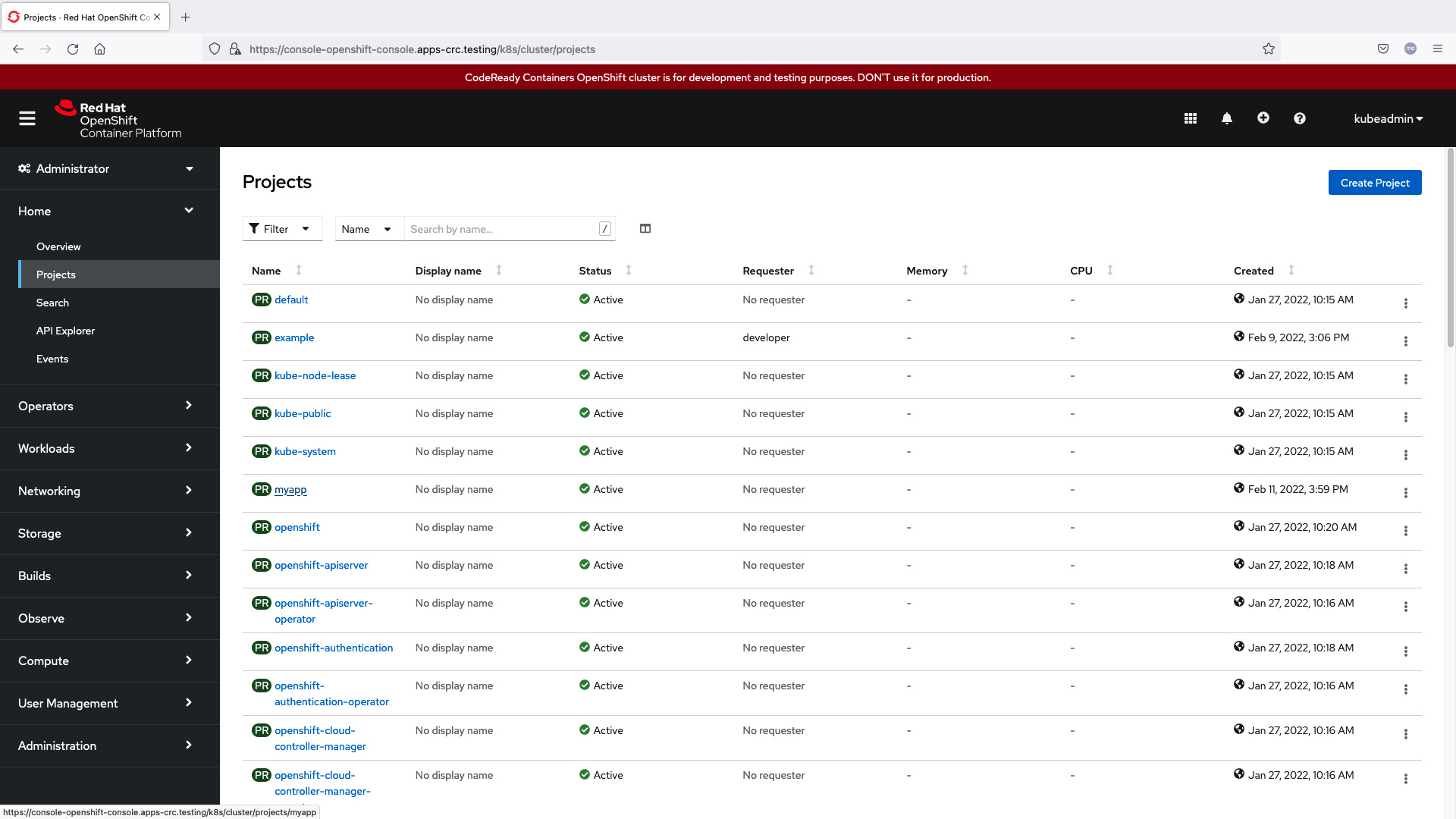
Conclusion
Now you know how to create Kubernetes or OpenShift namespace projects with Ansible.
See also: Optimize Kubernetes CPU Resources with Ansible Playbooks
Related Articles
- rendering files with Ansible template
- how Ansible inventory works
- Ansible troubleshooting - Kubernetes K8s or OpenShift OCP 401 Unauthorized
Further reading
To go deeper, Ansible for Kubernetes by Example expands on these patterns in production.
Category: installation
Watch the video: Create Kubernetes K8s or OpenShift OCP namespace project - Ansible module k8s — Video Tutorial